Live experimental · DeepSeek Harness GUI · macOS arm64
One-click local wrapper · Your key stays local · No terminal needed · Fully traceable
DeepSeek Harness GUI is a live experimental Desktop App wrapping the open-source harness for local execution — available now for macOS Apple Silicon (arm64). No terminal or environment setup. Bring your own API key from DeepSeek / Anthropic / OpenAI. Your key stays local — third-party wrapper, not affiliated with DeepSeek, unsigned and not notarized.
Live experimental build: Download above is the GitHub Release dsh-desktop-v0.1.0 — Unsigned / Not notarized — Experimental · macOS Apple Silicon (arm64) only · Requires macOS 13+. Verify SHA256, then Gatekeeper requires manual open: right-click → Open or xattr -cr "DeepSeek Harness Desktop.app" (at your own risk). Third-party wrapper around the official open source deepseek-ai/deepseek-harness, maintained by an independent community, not affiliated with DeepSeek.
Live experimental build available above — the list below is for community updates and feedback only.
Local by design — code and credentials stay on your machine; the app uses your own model key and never uploads it.
Unofficial community waitlist — not affiliated with DeepSeek · independent community. Joining costs nothing and does not charge your card. MIT-licensed core: github.com/deepseek-ai/deepseek-harness
Sponsored
What it is
It is an open-source agent harness from DeepSeek AI — a v0.1 developer preview under the MIT license. A harness is the runtime that turns a language model into a working agent: tools such as file editing, shell and search, session management, permission policies, and a record of every step so a run can be inspected, resumed or replayed.
Its design principle is that everything is a plugin — models, tools, skills, sessions, sandboxes, storage, loops, scheduling and the UI — on the Cordis framework. It ships four presets (Standard, Code, Minimal, Creator) and writes an append-only session log powering a trajectory view of prompts, reasoning, tool calls and results.
The official way to run it today is a local command, npx @deepseek-ai/dsh web, which assumes Node.js, a terminal and a configured model provider. You bring your own key from DeepSeek, Anthropic, OpenAI or any OpenAI-compatible endpoint — the model adapter is a plugin, so switching providers needs no framework changes. The Desktop app aims to handle installation, setup and updates, so the open-source engine stays the same underneath.
Want to see how it works end to end? Follow our DeepSeek Harness tutorial, or go straight to the install guide if you are ready to try the official command-line version today.
Pricing hypothesis
Prices shown here are a working hypothesis, not an offer. Nothing is being sold yet. Future plans may change; we do not promise permanent free access.
Download · Honesty note · Trajectory Ruler
A third-party desktop wrapper around the official open source deepseek-ai/deepseek-harness. Your key stays local and never passes through our servers. The download appears only after a reproducible build passes verification.
Verify (GitHub Release)
shasum -a 256 -c dsh-desktop-0.1.0-mac-arm64.zip.sha256 cat BUILD-INFO.txt # Local reproducible mirror: shasum -a 256 -c artifacts/internal/dsh-desktop-0.1.0-mac-arm64.zip.sha256
118168931c3e3064b0a785e35011f08f0c4100c7c923ab1671933266f8886439, arm64) is available now as an unsigned, not-notarized asset. Gatekeeper will block it — right-click → Open or xattr -cr "DeepSeek Harness Desktop.app" (at your own risk). Local reproducible build remains at artifacts/internal/dsh-desktop-0.1.0-mac-arm64.zip; Cloudflare releases/ stays honest-pending until signed. Verify: shasum -a 256 -c dsh-desktop-0.1.0-mac-arm64.zip.sha256 and fallback shasum -a 256 -c artifacts/internal/dsh-desktop-0.1.0-mac-arm64.zip.sha256. BUILD-INFO at https://github.com/18815292408/deepseek-harness-desktop/releases/download/dsh-desktop-v0.1.0/BUILD-INFO.txt and artifacts/internal/BUILD-INFO.txt. This page is an independent community, not affiliated with DeepSeek.Visualizing the append-only session log — each step traceable
The ruler is the log's scale: a 1px line marked in execution order — prompt start, reasoning segment, three tool_call notches, permission gate diamond, result fill. Hover a notch to see the tool name.
Tool call shapes: file_edit square · shell slanted · search round · gate diamond. Only line and notches, no gradients/shadows/decorative orbs.
Community-published, verifiable third-party wrapper source and experimental build artifacts. The primary live download is the GitHub Release (external, unsigned experimental) — see the button above; Cloudflare releases/ remains honest-pending until signed. The entries below are trusted GitHub links.
xattr -cr (at your own risk) · deepseek-harness.io is an independent community page, not affiliated with DeepSeek · MIT license (wrapper and upstream both MIT) · No claim of signed/notarized/certified or official affiliation.
Repository and Release asset verification (experimental, arm64 only):gh repo view 18815292408/deepseek-harness-desktop --json visibility,nameWithOwner · shasum -a 256 -c dsh-desktop-0.1.0-mac-arm64.zip.sha256 · SHA256 118168931c3e3064b0a785e35011f08f0c4100c7c923ab1671933266f8886439 (prefix 11816893) matches the internal build, see repository README and Release notes.
Community updates
The live experimental build is available now for macOS Apple Silicon (arm64) via the download above. The list below is for community updates and feedback only — joining is free, takes one minute, and does not affect your ability to download. Share your setup so we can prioritize fixes.
Testers who share feedback may later receive an invitation to a paid beta — no payments are collected on this page today, and the current build remains a live experimental release.
FAQ
A coding harness is the runtime around a language model that makes it a working agent: tool execution (file editing, shell, search), session management, permission policies and a traceable log. DeepSeek Harness is an open-source harness where every one of those capabilities is a replaceable plugin.
The live experimental Desktop GUI is available now for macOS Apple Silicon (arm64, requires macOS 13+). The waitlist is for community updates and feedback only — joining reserves no exclusive access, costs nothing, and does not affect downloading the live experimental build. It helps us prioritize fixes and reach you with updates.
The source code is free under the MIT license. Running an agent still needs model access: you configure a provider such as the DeepSeek API with your own key, and tokens are billed by that provider. The desktop app does not change that — you keep using your own key.
Yes. The official documentation covers other providers and custom OpenAI-compatible endpoints. Because the model adapter is itself a plugin, swapping models does not require changing the framework source.
Not yet for production. DeepSeek labels the harness a developer preview and warns that breaking changes are coming. The project changes quickly, so anything built on top needs to track changes deliberately. The live experimental Desktop GUI above is available now for testing, and the community list helps us gather feedback while we iterate.
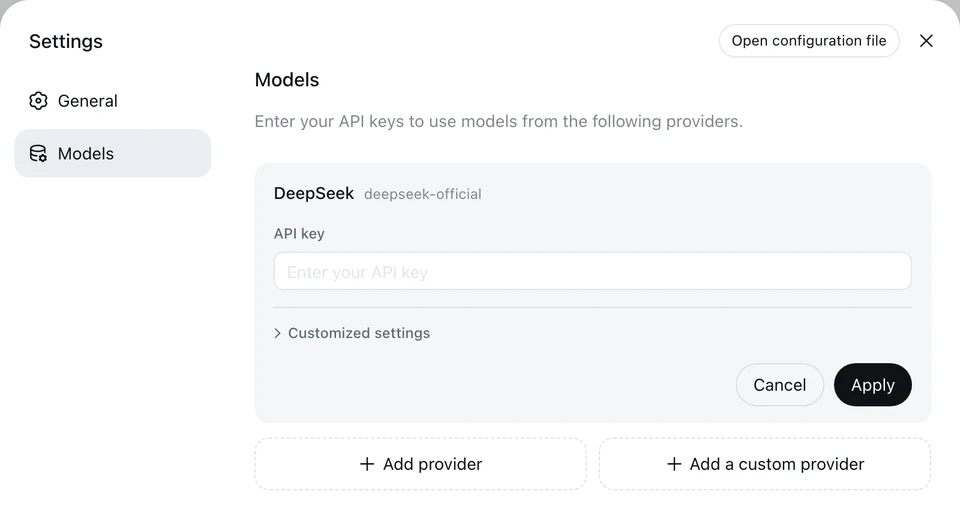
Yes. You add your own key in Settings → Models, and tokens are billed by that provider. The Desktop app keeps that model: your key stays on your machine and is never sent to us.
Install Node.js, run npx @deepseek-ai/dsh web, then open the URL it prints, add your key under Settings → Models and pick a workspace. Our install guide covers each step, and the tutorial explains the concepts.